Servers Are Up Engineering··12 min read·Technical Review Verified
Custom Server Configuration: How to Size, Build and Secure Yours
custom server configuration
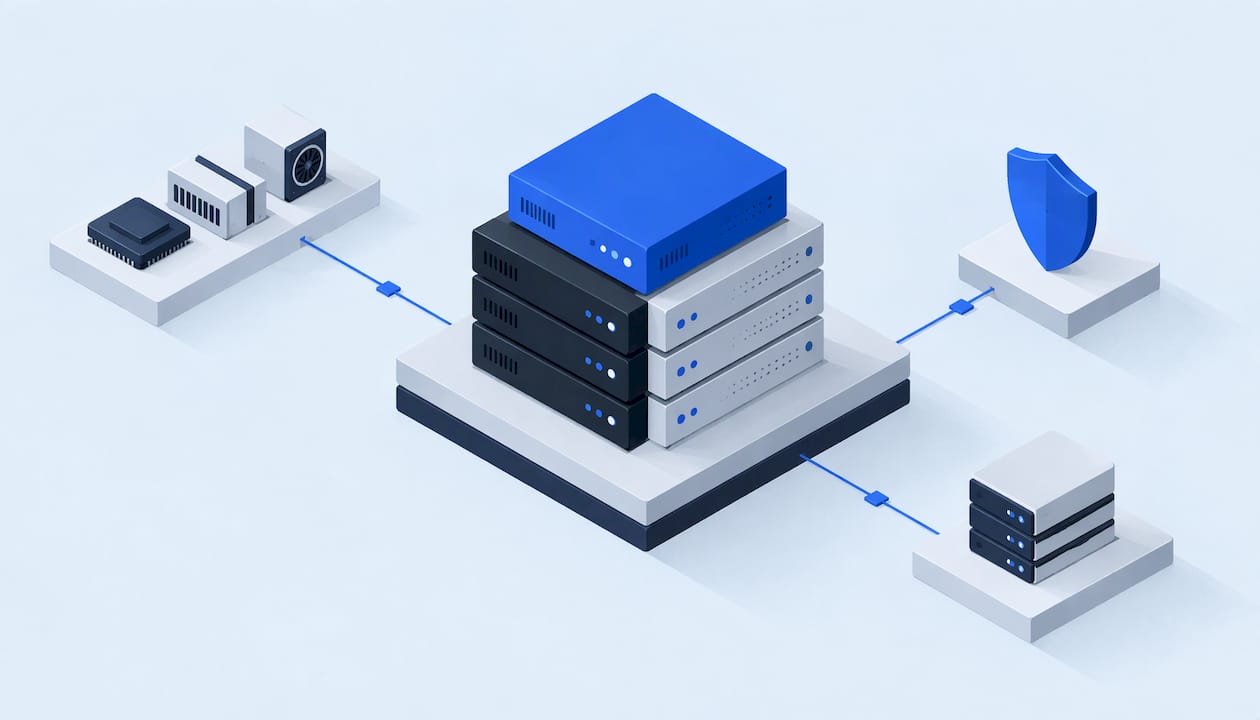
A custom server configuration is a server whose CPU, memory, storage, network and operating system you choose for your own workload instead of accepting a fixed bundle. The fastest way to get one right is to size it from measured usage, start with a plan you can resize, and manage it from a single browser console. That is how we build Servers Are Up: Linux and Windows servers, game servers and containers that you size per unit and reach from one tab, with no software to install.
This guide walks through the whole process: what a configuration actually contains, how to work out the numbers, how to set up access and security, and how to change the setup when your workload grows.
A server configuration is the set of decisions that define how a server behaves. Think of it in four layers:
"Custom" simply means you set these layers to fit your job. A developer running a build pipeline, a hobbyist hosting a local language model, a small business running Windows line-of-business software and a group of friends running a game server all need different mixes of the same four layers.
The pages that rank for this phrase mostly sell physical hardware: rack servers you assemble part by part, with chassis, processors and drives. That route makes sense when you want to own the metal. If what you need is a working server today that you can resize next month, a virtualized server is the shorter path, and the decisions below apply to both.
The most common mistake is picking a size by feel. Two sources give a reliable method.
HashiCorp's cloud architecture guidance recommends profiling workloads with load and stress tests while monitoring CPU, memory, response latency and application error rates. In plain terms: run the application under realistic traffic and watch which resource runs out first.
cPanel's upgrade-planning guidance describes the arithmetic for an existing server. Compare what is available with what is used, extrapolate the growth rate across the server's expected lifetime, and handle each resource separately, using collected data on CPU, memory, disk, network and load over time.
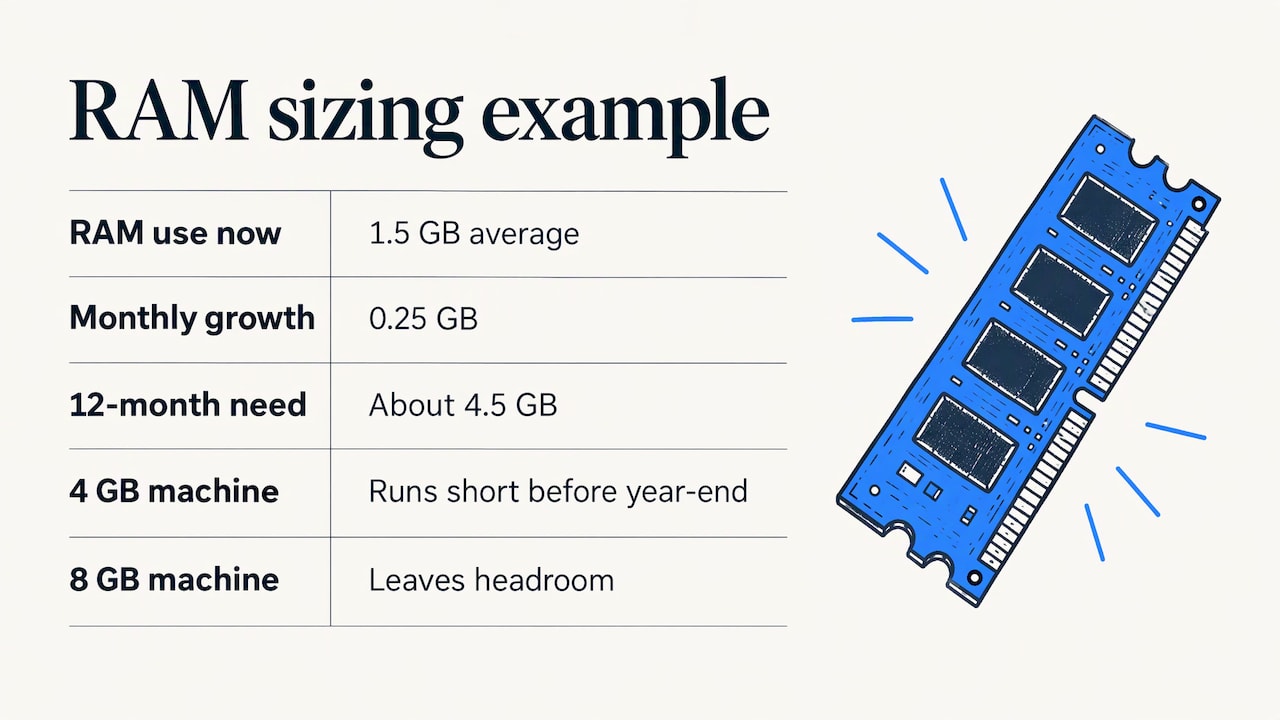
A worked example. Suppose your app server averages 1.5 GB of RAM in use and grows by about 0.25 GB per month. For a twelve-month horizon you need roughly 4.5 GB, so a 4 GB machine would run short before the year is out and an 8 GB one leaves headroom. Do the same sum for disk and CPU separately, because they rarely grow at the same speed.
If you have no existing server to measure, start small, load-test, and resize. That is where flexible sizing earns its keep: you are not locked into your first guess. Our guides on server sizing for workloads and server capacity planning go deeper on the arithmetic.
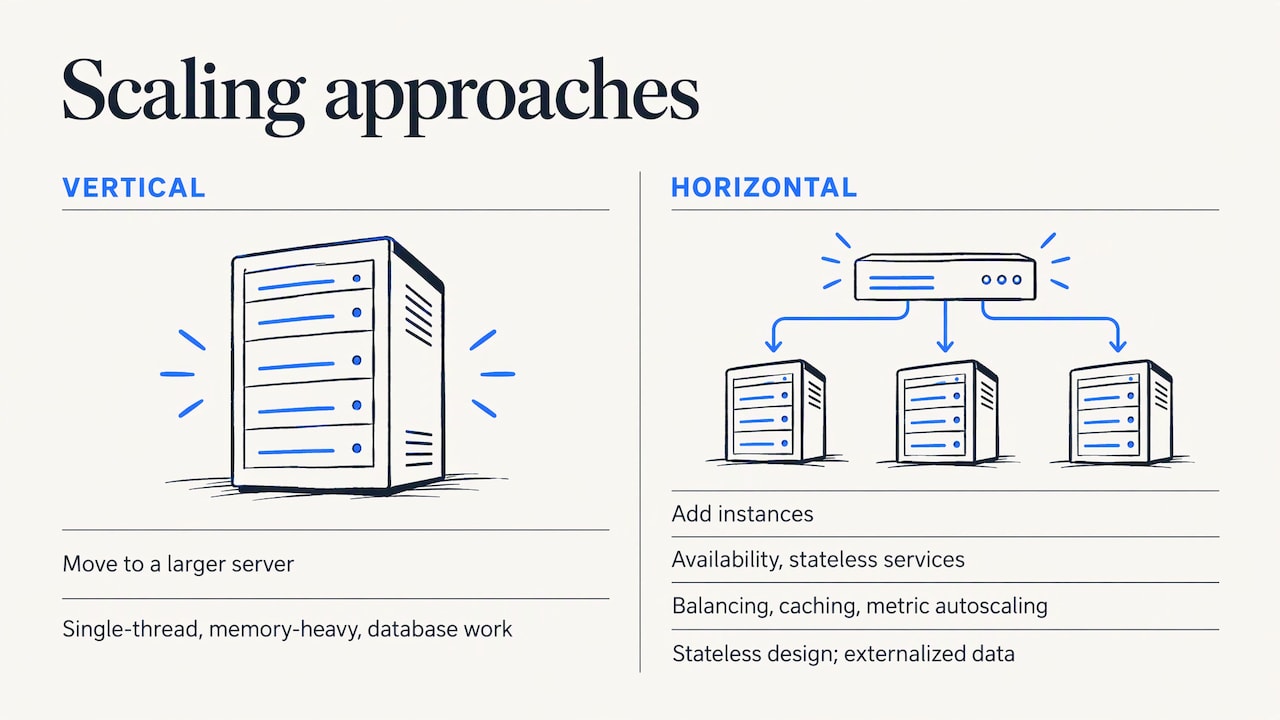
HashiCorp's guidance is to use vertical scaling, meaning a more capable single instance, for single-threaded, memory-intensive or database workloads, and horizontal scaling, meaning more instances, for availability, fault tolerance or stateless applications. So a database or a game world that lives in one process wants a bigger single server. A web front end that keeps no state can be spread across several small ones.
For AI work, NVIDIA's configuration guide says GPU choices should follow the application workload, dataset, model size and use case. It also describes patterns from a single GPU to partitioned GPUs to multi-node clusters, where high-speed interconnects carry traffic between servers. Most hobbyists never reach multi-node territory. If you are deciding whether your workload needs a GPU at all, our explainer on CPU versus GPU differences covers it, and our AI hosting page shows the self-hosted tools people run.
Size storage for data plus growth, and treat it as a separate line from compute, since it usually grows on its own schedule. On the network side, decide early whether the server needs a public address. On our platform a public IPv4 address is a paid add-on at 5 USD per month, so a server that only talks to your other machines over a private network or VPN does not have to carry one.
Choose the OS by what the software requires. Linux suits most developer tooling, containers and game servers. Windows suits Windows-only applications, remote desktops and .NET stacks. Our Linux plans are listed on the Linux server page, and Windows plans, including a Windows Server desktop at 66 USD per month, are on the Windows server page.
How you reach the server matters as much as how big it is. The University at Buffalo's server security standard calls for encrypted remote administration and secured console sessions, individual administrative accounts, role-based access where possible, and logging of privileged operations.
Put that into practice:
On Servers Are Up, the terminal or desktop for each server opens in your browser, and you can place several side by side in one tab. That removes the usual stack of SSH clients, remote-desktop apps and VPN software on every laptop. Our article on secure remote access from a browser explains how to set it up safely, and our on-demand server hosting guide shows the one-tab workflow in practice.
If you already run machines elsewhere, you can bring them into the same console. Connecting your own machines costs 3 USD per month per machine, so a mixed setup of cloud and on-premises hardware can be managed from one place.
The Buffalo standard asks you to record each server's purpose, owner, network identity and data classification and keep the record current as the server changes. Even a short note in your repository does the job. It is the first thing you will want at 2 a.m. when something breaks.
The same standard calls for a minimal operating-system configuration, removal or disabling of unnecessary services, host and network firewalls, and allow-listed inbound access limited to required ports and source hosts. For a web server that usually means ports 80 and 443 open to the world, and administration open only to the addresses you use.
For Linux specifics such as key-based SSH, UFW firewall rules, service sandboxing and backups, follow our Linux server security hardening checklist. For a printable version covering Linux, Windows and game servers, use the server hardening checklist. If you deploy with Docker Compose, our Compose security linter checks your file for risky settings.
Containers make a configuration repeatable. The Redpoint game-server guide explains that Docker images package a server and its dependencies so it runs the same way on different machines, while Kubernetes schedules a declared number of replicas across servers. We offer both: Docker Starter at 11 USD per month, Docker Standard at 19 USD per month, a K8s Dev Cluster at 38 USD per month and a K8s Standard Cluster at 114 USD per month, listed on the containers page.
Our platform exposes an API and an MCP endpoint, so your own AI agents can create, inspect and change servers. Anything that can act on your infrastructure needs tight permissions. A checklist for MCP security best practices helps you turn the specification's requirements into concrete controls. To host the agents themselves, see our guide to AI agent hosting; Agent Micro is 9 USD per month and Agent Standard is 19 USD per month on the products page.
HashiCorp's perspective is that load and stress testing reveal the right scaling direction and how the workload fails before users run into those limits. Before launch, push the server past your expected peak and note which resource saturates first and what the application does when it does.
No first configuration survives contact with real use. Plan for change in two directions.
Vertical: move to a larger server for single-threaded, memory-heavy or database work. Horizontal: add instances for availability or stateless services, using load balancing, caching and metric-based autoscaling. HashiCorp notes that stateless design and externalized data make horizontal scaling easier, so keep databases and uploads off the app server from the start.
Game servers are a special case. The Redpoint guide notes that they are stateful compared with typical web front ends, so any scaling or restart has to avoid shutting a server down while a match is in progress. It also describes Agones, a system that manages fleets of game servers and autoscales to player demand. If you simply want a server for your community, our game server hosting starts from 7.99 USD per month.
| If you are... | Start with | Price per month |
|---|---|---|
| A developer who needs a Linux box | Linux Starter, then Standard or Pro | 11 USD, 38 USD, 76 USD |
| Running Windows-only software | Windows Starter, Standard or Pro | 35 USD, 66 USD, 116 USD |
| Wanting a Windows remote desktop | Windows Server desktop | 66 USD |
| A hobbyist or small team wanting a pooled lab | Hobby Lab, Developer Studio or Team Workspace | 32 USD, 64 USD, 258 USD |
| Deploying containers | Docker Starter or Standard | 11 USD, 19 USD |
| Running Kubernetes | K8s Dev or Standard Cluster | 38 USD, 114 USD |
| Hosting a game with friends | Game servers | from 7.99 USD |
The pooled plans on our virtual datacenter page suit people who want to carve one resource pool into several servers instead of buying them one by one.
Our view: configure once, adjust often
We built Servers Are Up around a simple belief: the configuration you choose on day one is a hypothesis, and the platform should make it cheap to change. That is why each server is sized per unit, why terminals and desktops sit side by side in a single browser tab, and why the same console covers Linux, Windows, game servers and containers.
We also think the console should not be a walled garden. You can connect machines you already own, manage the network and VPN from the same place, and drive everything through the API and MCP endpoint with your own AI agents.
Our infrastructure is owned and operated in the United States, which is the foundation for the reliability and data security we promise. Choose the smallest plan that passes your load test, watch the numbers, and move up when the data says so.
— Servers Are Up Engineering
If you want to put this into practice, pick the plan closest to your measured needs and adjust from there. Linux servers start at 11 USD per month, and you can compare every size on the Linux plans page.
Need several servers, game hosting or containers? The Servers Are Up home page lists every product, and the pricing page shows add-ons such as the 5 USD per month public IPv4 address and the 3 USD per month fee for connecting your own machines.
A custom server is one whose hardware resources and software are chosen to fit a specific workload rather than taken from a fixed package. In practice that means picking the CPU, memory, storage, network and operating system yourself. On a virtualized platform you can change those choices later without replacing hardware.
Start by measuring what your workload uses under realistic load, then choose CPU, RAM and disk with headroom for growth. Install a minimal operating system, open only the ports you need, and give each administrator an individual account. Document the result and load-test it before real users arrive.
Server configurations are the combined settings of a server's compute, storage, network and software layers. They determine how fast it runs, who can reach it and how it behaves under load. A good configuration is documented, repeatable and easy to adjust.
Scale up, meaning a bigger single server, for single-threaded, memory-intensive or database workloads. Scale out, meaning more servers, for availability and stateless applications, as HashiCorp's guidance describes. Game servers hold match state, so they need care before any restart.
Explore With AI & Cite This Page
Open a grounded prompt in your AI assistant or copy a clean Markdown, HTML, or APA reference link.
Validate protocols and subnets directly in your browser or continue reading related architecture notes.
SSH Keygen Generator & Cloud-Init YAML Builder
Free WHOIS & RDAP Domain & ASN Lookup Tool
CVE Vulnerability & CISA KEV Banner Advisor
AI Development Server: What You Need and How to Set One Up
What an AI development server does, how to size CPU, memory, storage and network for your workload, and how to run one from your browser with flat monthly pricing.
Server Sizing for Workloads: How to Pick CPU, RAM and Storage
Size a server to the workload, not the price tier: measure peak load, set RAM, CPU, storage and network separately, add headroom and know when to resize.
On-Demand Server Hosting: Run Every Server From One Browser Tab
On-demand server hosting explained: how it works, which server types fit dev, AI, business and game workloads, what it costs, and how to launch one in a browser.
Secure Remote Access to Your Servers From a Browser
How to get secure remote access to a private Linux or Windows server from a browser: keys, isolation, logging and a setup you can run in one tab.