Servers Are Up Engineering··9 min read·Technical Review Verified
Deploy Apps Instantly: From Repo to Live Server in Minutes
deploy apps instantly rapid application deployment
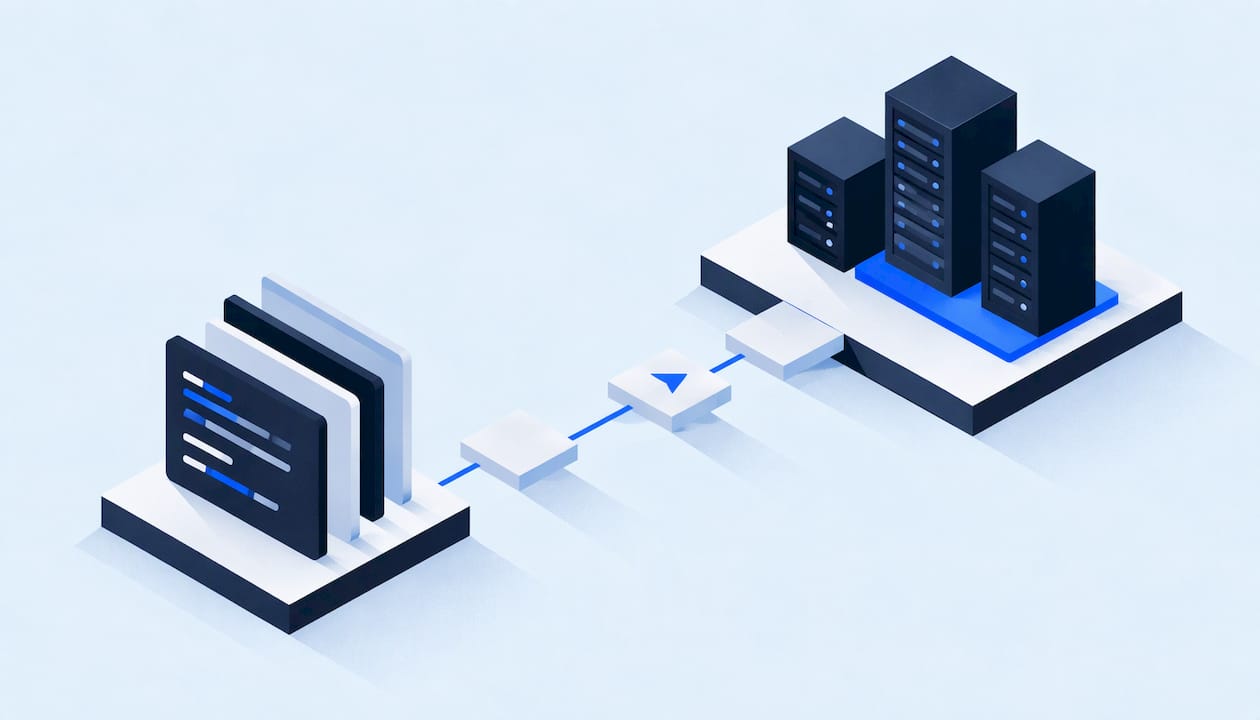
You can deploy an app in minutes when three things are settled before you start: a build that produces a deployable output, a server or container that is already running and reachable, and a way to see what is happening on it. We built Servers Are Up around that idea: app containers, Docker and Kubernetes plans and Linux or Windows servers you open in a browser tab, so there is nothing to install before your first deploy.
Atlassian describes deployment as packaging, configuring, moving, verifying and monitoring software in a target environment. It can be manual or automated, and it is separate from the product decision to show a feature to users. You can deploy code on Tuesday and switch it on for customers on Friday.
That definition explains why "instant" is realistic. Most of the time in a slow deployment goes to setup: installing tools, opening ports, copying keys. Remove those steps and the remaining work is a build, a transfer and a check.
Two terms to know:
The DORA research program says a deployable release needs a package from continuous integration, scripts for environment configuration and deployment tests, and environment-specific configuration. In plain terms:
If you do those four things, the deployment itself is the short part.
The official Vite guide says a Vite project is built with npm run build, and the output lands in the dist directory by default. It also warns that vite preview is meant for local checks, not as a production server. So the deployment is: build, copy dist to a web server such as Nginx, and point your domain at it.
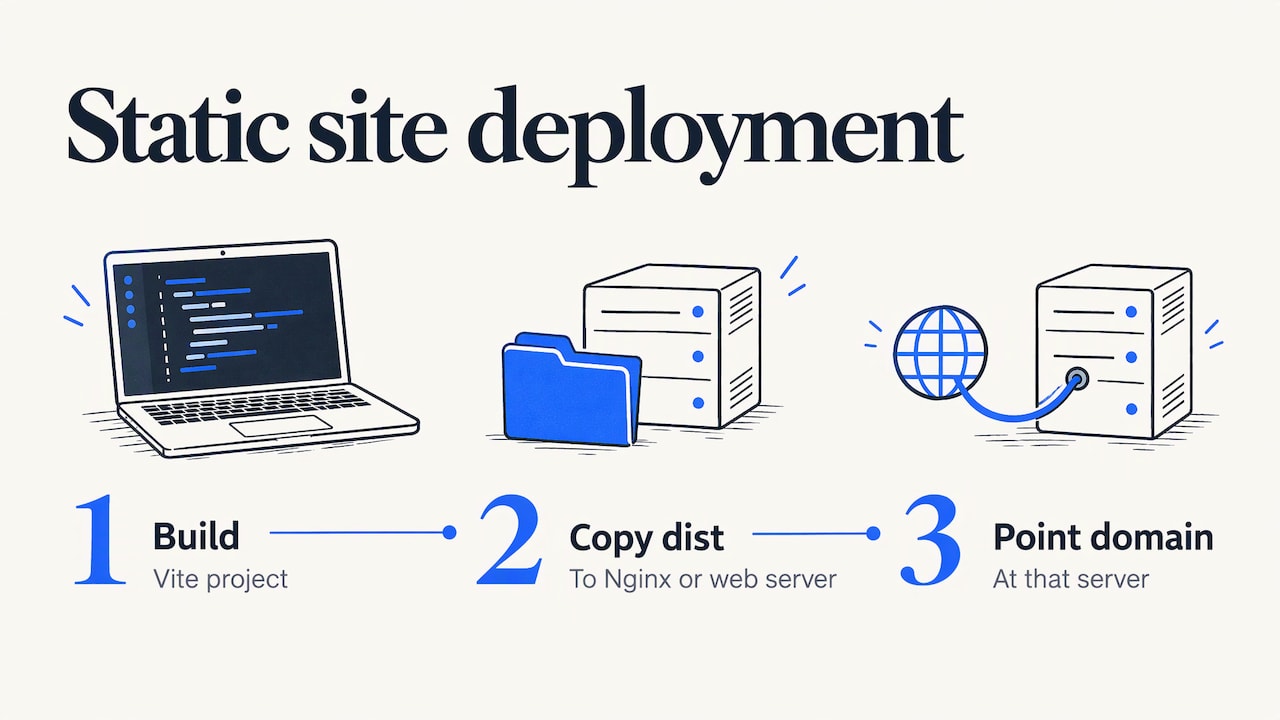
On a Linux server from us, you open the server's terminal in the browser, pull your repository, run the build and serve the folder. Because the terminal and the desktop open side by side in one tab, you can edit a config in one pane and watch the logs in the other.
If your app is already containerized, a container plan is the shortest route. You build or pull an image, set environment variables and expose a port. Our Docker Starter plan is $11 per month and Docker Standard is $19 per month, and app containers run from $8 to $46 per month depending on size. When you need orchestration, the K8s Dev Cluster is $38 per month and the K8s Standard Cluster is $114 per month.
Some software needs a specific OS configuration, a background service, a desktop session or Windows itself. A full virtual server is the better fit here. Linux plans run $11, $38 and $76 per month for Starter, Standard and Pro. Windows plans run $35, $66 and $116 per month, with a Windows Server desktop at $66 per month.
The choice comes down to how much of the stack you want to own.
| Your situation | Better fit |
|---|---|
| App already has a Dockerfile or compose file | Containers |
| Several small services that scale separately | Containers or a Kubernetes cluster |
| Custom OS packages, system services, or a Windows app | Linux or Windows server |
| You want a remote desktop to a Windows tool | Windows Server desktop |
| Dev, staging and test side by side | Virtual datacenter pool |
For a team that wants several environments at once, our virtual datacenter plans pool resources: Hobby Lab is $32 per month, Developer Studio $64 and Team Workspace $258. You split the pool into as many servers and containers as the workload needs, which suits dev and staging setups where production should mirror staging.
Fast should not mean blind. The Octopus Deploy checklist recommends that before release you review code and dependencies, run automated tests, keep staging aligned with production, secure secrets and network access, and back up databases while testing restores. It also says to choose a release strategy such as blue-green, canary or rolling updates according to your architecture and risk tolerance.
The Australian Cyber Security Centre's October 2024 guidance adds that teams should run unit, integration and automated tests ideally in an environment close to what customers use, and prepare monitoring, alerting, incident playbooks and rollback procedures before shipping.
A practical version for a small team:
Atlassian also notes that smaller, more frequent updates are easier to test, review and roll back than large releases. Instant deployment makes that habit cheap.
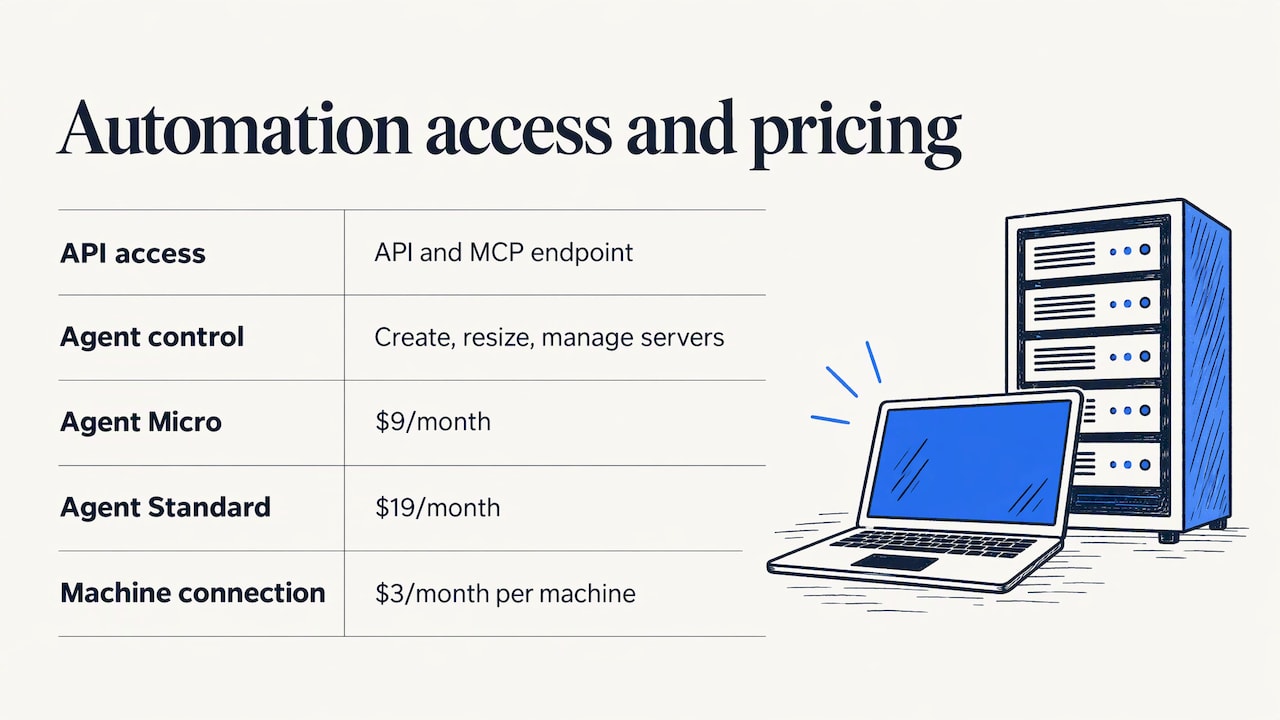
Once a manual deploy works, script it. Our platform exposes direct API access and an MCP endpoint, so your own AI agent or script can create, resize and manage servers without a human clicking through a console. If you want an always-on agent environment, Agent Micro is $9 per month and Agent Standard is $19 per month on our products page.
If your app has to talk to machines you already own, you can connect them to the same console for $3 per month per machine, and a public IPv4 address is $5 per month. Both are on our pricing page.
Game servers are apps with extra needs. TCAdmin's documentation lists the kind of controls they call for: automatic crash restart, query monitoring, scheduled Steam updates and service relocation between hosts. Our game servers start from $7.99 per month, with pages for Counter-Strike 2, Project Zomboid and 7 Days to Die. For console, mod and backup routines, see our guide to managing dedicated game servers.
A deployment is only as good as the hours after it. Plan for restarts, disk space and backups from day one. Our guide to server uptime best practices covers monitoring and recovery habits. Our infrastructure is owned and operated in the United States, which matters if you care where your data and workloads physically run.
Most deployment pain comes from tooling between you and the machine: a client to install, a VPN to configure, a dashboard for each environment. We think the console should be the machine.
That is why every server, container and network we host opens in one browser tab, with terminals and desktops side by side. You deploy, check the logs and fix a config without switching tools.
We also think automation should be a first-class path. The same API and MCP endpoint that power our console are available to your scripts and your own AI agents, so a manual deploy today becomes a repeatable one tomorrow.
Flexible sizing, pooled resources and the ability to connect your own machines mean the platform grows with the app instead of forcing a migration.
— Servers Are Up Engineering
If your app is containerized, begin with Docker Starter at $11 per month. If it needs a full operating system, choose a Linux server from $11 per month or a Windows server from $35 per month. Open it in your browser and run your first deploy from the terminal.
Before handing shell or repository credentials to an AI coding agent or promoting an isolated environment, validate your MCP configuration against tool-poisoning and hardcoded-secret leaks, then execute bounded commands over TLS 1.3 or short-lived SSH leases:
# Scan an mcp.json configuration with open-source ops-cage before launching agents
npx --yes @serversareup/ops-cage@latest scan ./mcp.json --sarif ops-cage.sarif

# Connect Claude Code directly to Servers Are Up hosted MCP endpoint
claude mcp add --transport http serversareup https://serversareup.com/api/mcp/v1
{
  "mcpServers": {
    "serversareup": {
      "url": "https://serversareup.com/api/mcp/v1",
      "headers": {
        "Authorization": "Bearer <SCOPED_PAT>"
      }
    }
  }
}
Compare turnkey AI and agent runtimes on AI Agent Infrastructure, deploy standalone containers at /containers, or automate provisioning cleanly through the REST API v1 Reference.
With a working build and a ready server or container, a simple app can be live in minutes. The time goes to the build, the transfer and the smoke test. Setup of the environment is what makes deployments slow, so having it ready is the real shortcut.
No. Our servers, containers and networks open in the browser, with terminal and desktop views you can place side by side. You do not need a separate client or remote-access tool.
Use containers if your app already has a Dockerfile or runs as small separate services. Use a Linux or Windows server when you need control over the operating system, system services or a desktop session.
Yes. Our platform offers API access and an MCP endpoint, so scripts and your own AI agents can create and manage servers. Combine that with a build step and a smoke test and each release becomes repeatable.
Explore With AI & Cite This Page
Open a grounded prompt in your AI assistant or copy a clean Markdown, HTML, or APA reference link.
Validate protocols and subnets directly in your browser or continue reading related architecture notes.
Game Server Crash & TPS Lag Log Analyzer
Free IP Subnet Calculator & CIDR Cheat Sheet
Online TCP Port Checker — Ports 443, 22, 25565
Custom GitHub Apps: deploy a commit of your own repository
Custom GitHub Apps are on sale: choose a public repository and exact 40-character Git commit SHA in the store, and we build and run it on your own isolated OpenStack host.
Java Hosting in Production: JVM Memory Anatomy, Generational ZGC, and Hardened Linux Deployment
Deploy Java 21+ services on Linux KVM without OOM kills: JVM off-heap memory math, Generational ZGC vs G1GC, virtual thread pinning, systemd, and Caddy TLS.
On-Demand Server Hosting: Run Every Server From One Browser Tab
On-demand server hosting explained: how it works, which server types fit dev, AI, business and game workloads, what it costs, and how to launch one in a browser.
Secure Remote Access to Your Servers From a Browser
How to get secure remote access to a private Linux or Windows server from a browser: keys, isolation, logging and a setup you can run in one tab.